Body
OVERVIEW
The standard campus phone is an IP or digital multiple line display phone capable of supporting simultaneous incoming or outgoing calls for one or more telephone numbers. During incoming calls the phone provides calling party name and number display (when available), a voice mail indication lamp or indicator and the ability to forward calls, transfer calls, and join multiple calls for a conference of up to six parties.


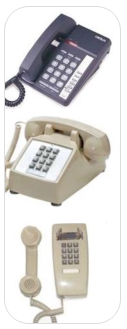
Plain or Traditional Telephones (Used for Analog Line Service)
Traditional analog desk and wall phones are often provided as a courtesy in public areas or used in student residences. Generally, these phones are not equipped with advanced features; when provisioned, you may access special features by using the switch hook (receiver button).
Call Waiting: If you are on the phone and a second call comes in, you will hear a beep tone. If you hear the beep and want to answer the call, press and release the switch hook quickly. The first call will be put on hold and you will be connected to the second call. To switch back and forth between the two calls, press and release the switch hook again.
Call Hold: To place a call on hold press and release the switch hook quickly. To retrieve the call, just press and release the switch quickly.
Transferring a Call: To transfer a call to another party, press and release the switch hook to put your first call on hold. Wait for the interrupted dial tone, then dial the third person's number. You can talk before you transfer the original caller. To complete the transfer, hang up.
Using Your Campus Phone
Dialing Instructions
Dialing Instructions for the University Telephone System
- Emergency Services: Dial 9 + 911 or 9 + 1 + 215 895 2222
- Calling US, Canada, and some Caribbean Countries: Dial 9 + 1 + ten digit number
- International Calling: Dial 9 + 011 + country code + city code + number
- Domestic Directory Assistance: Dial 9 + 1 + area code + 555 + 1212
- Four digital dialing between University phones is possible as outlined below
Phone Numbers Used by the University Telephone System
- Four digital dialing is possible between university phones with the following numbers:
- 215.895.nnnn
- 215.571.nnnn
- Phones with these numbers may be located on any campus
- Four digital dialing is possible between university phones with the following numbers:
- 267.359.xxxx
- 215.553.xxxx
- 215.299.xxxx
- 215.405.xxxx
- Phones with these numbers may be located on any campus
Phone Numbers Used by the Other Telephone Systems
Some campus locations are not served by the University phone system. Instead they are served by a speciality phone system or a service provided by a third party. In these cases the instructions on this web site may not apply. Check with your local support team for additional information.
- Phones with these numbers are used by the College of Medicine in multiple locations
- 215.255.nnnn
- some 215.762.0nnn, 215.762.26nn, 215.762.5nnn, 215,762.6nnn, 215.762.8nnn, 215.762.9nnn
- some 215.965.nnnn, 215.507.nnnn
- other numbers not listed here
- Drexel IT operates this Cisco phone system for COM
- Phones with these numbers are used by the College of Medicine at Queen Lane
- 215.991.nnnn
- Drexel IT operates this Nortel/Avaya phone system for COM
- Phones with these numbers are located on the 11th Street Family Services campus
- 215.769.yyyy
- This is phone service provided by a third party. Contact your local support teams for assistance.
- Phones with these numbers are used in NCB and Bellet buildings
- 215.762.nnnn
- Previously Operated by Hahnemann University Hospital, in-transition to Drexel University. See Update.
Standard Features
Standard Features for Multiple Line Display Phones
Place a Call on Hold
Use the Hold feature when you are talking on one line and another call arrives on a second line. To retain the original call, put it on hold and then answer the second call.
- To place a call on hold: Press the HOLD key. The LCD indicator will flash beside the line on hold.
- To retrieve a call on hold: Press the line key beside the flashing LCD indicator.
Transfer a Call
Use the Transfer feature to redirect a call to the appropriate person.
To transfer a call to a third party:
- Press the TRANSFER soft key. The other party is put on hold and a dial tone sounds. The LCD indicator light flashes steadily.
- Dial the number to which you are transferring the call.
- When that number rings or a person answers, press the TRANSFER soft key to connect the calling party.
If the person called is not available, press the line key (next to the LCD indicator) to reconnect to the original call.
Conference Calling
Use the Conference feature to set up a conference call for three to six people, including yourself.
To set up a conference call:
- While on a call, press the CONFERENCE soft key to place the party on hold. You will hear a dial tone.
- Dial the number of the person you want to add to the conference call. You can talk privately to the person you are adding at this time. Repeat this process until you have dialed all parties.
- Press the CONFERENCE soft key a second time to conference all parties together. If the person you attempt to add to the conference is unavailable:
- Press the GOODBYE key.
- Press the line key beside the flashing status icon to return to your original call.
Using Call Forward
Use the Call Forward feature to direct incoming calls to ring on another number. If the phone is in the process of ringing, the call cannot be forwarded.
To forward your calls or change the forward number:
- Press the FORWARD soft key.
- Follow the prompts.
To cancel call forward:
- Press the FORWARD, CHECK FORWARD, or CHECKFW soft key.
- Follow the prompts
Charges and Calling Rates
Phone Charges and Calling Rates for Faculty and Staff
Per call charges and calling fees only apply to Drexel office phones. Phones provided by the University located in residence halls may call local numbers for free but cannot be used for long distance unless using a calling card.
Service Charges
Local Calling Rates
| City Day (Philadelphia Only) |
$0.03/call |
| City Evening (Philadelphia Only) |
$0.02/call |
| City Night & Weekend (Philadelphia Only) |
$0.01/call |
| Suburbs Day |
$0.03/call |
| Suburbs Evening |
$0.02/call |
| Suburbs Night & Weekend |
$0.01/call |
| Directory Assistance |
$1.00/call |
Long Distance Calling Rates
| In-state Day |
$0.05/min |
| In-state Evening, Nights, & Weekends |
$0.05/min |
| Interstate Day |
$0.05/min |
| Interstate Evening, Nights, and Weekends |
$0.05/min |
| International Rates |
View Rates [PDF] |
| Directory Assistance |
$1.00/min |
Phone Models
The following information is provided for reference purposes only.
Multiple Line Display Phone - Model 1140E (Avaya/Nortel)
This is the standard IP phone which uses the campus network to connect to the University provided telephone system.
Multiple Line Display Phone - Model M3904, M3903, M3902 (Avaya/Nortel)
The model 3900 series phone is the standard digital phone connected to the University provided telephone system.

Multipleline Phone - Model M2616 (Avaya/Nortel) - Discontinued
This digital phone connected to the University phone system is no longer available.